---
title: Managing Favourite Dashboards
description: Managing Favourite Dashboards
---
[Skip to content](https://academy.krunchbox.com/knowledge/managing-favourite-dashboards#main-content)

- [Help Center](https://academy.krunchbox.com)
- [www.krunchbox.com](https://www.krunchbox.com)
Open main navigation
Close main navigation
- [Help Center](https://academy.krunchbox.com)
- [www.krunchbox.com](https://www.krunchbox.com)
- [Contact Support](https://krunchbox.com/support/)
[Contact Support](https://krunchbox.com/support/)
How can we help you?
- There are no suggestions because the search field is empty.
1. [Help Center](https://academy.krunchbox.com/knowledge?hsLang=en)
2. [How-to Articles](https://academy.krunchbox.com/knowledge/how-to-articles?hsLang=en)
3. [Dashboards](https://academy.krunchbox.com/knowledge/how-to-articles?hsLang=en#dashboards)
# Managing Favourite Dashboards
## This article provides step-by-step instructions for end-users on how to efficiently manage their favorite dashboards within Krunchbox. This guide covers how to locate, select, and update dashboards to optimize your workflow.
#### **Key Features **
- **Access Favourite Dashboards Easily:** Retrieve your most used dashboards quickly for efficient monitoring.
- **Manage Dashboard Preferences:** Modify your favorites list to continually reflect your current priorities.
- **User-Friendly Interface:** Enjoy an intuitive design that makes updating and navigating your dashboards straightforward.
#### **Accessing the Dashboards**
**Log in** to your Krunchbox account.
Navigate to the **Dashboards** section from the main menu.
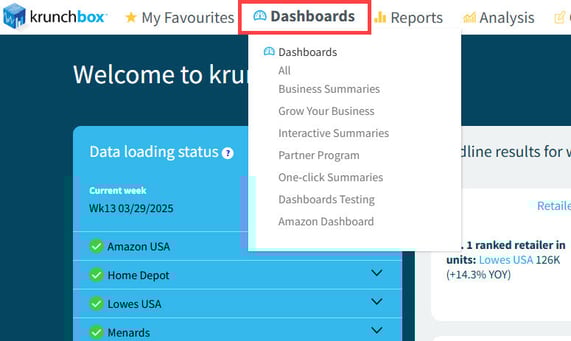
#### **Locating Favourite Dashboards**
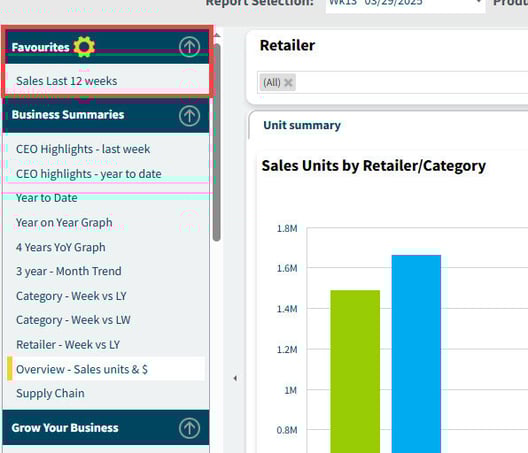
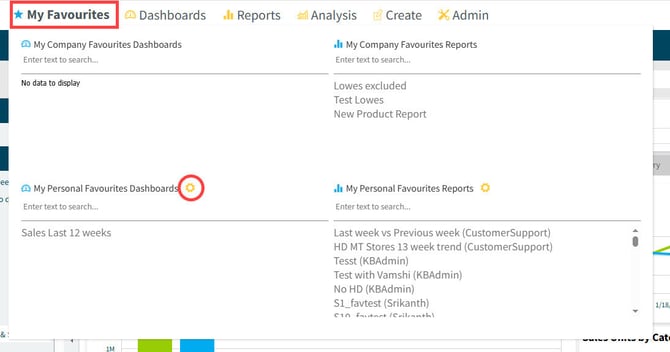
There are to places in krunchbox you can access your Favorite Dashboards
**1. At the top of your Dashboard Menu**
**2. Under My Favorites**
**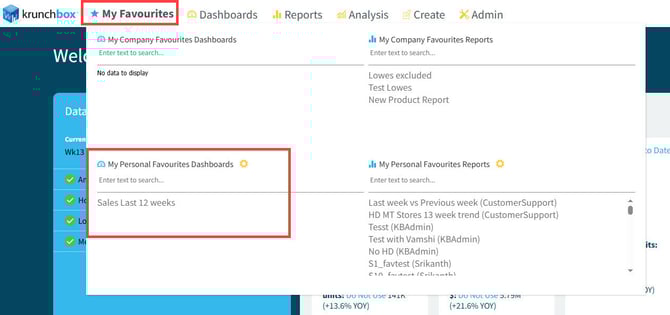**
#### **Adding a Dashboard to Favourites**
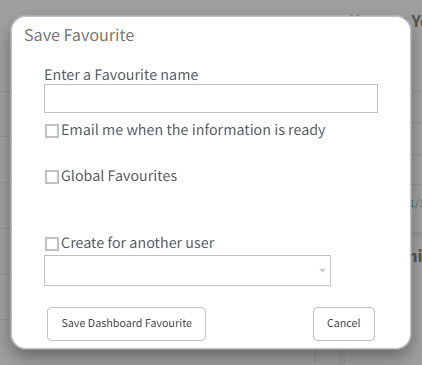
After customizing your dashboard, click **Save to Favorite**.
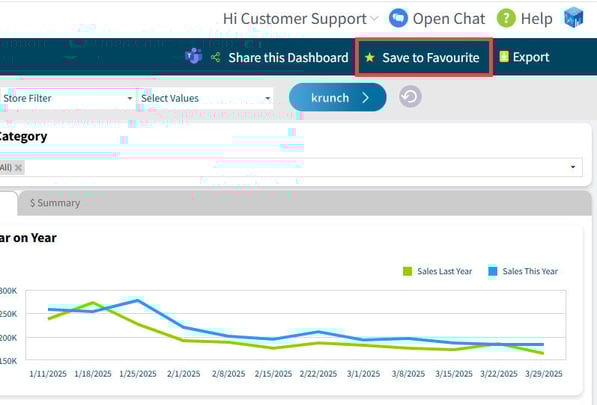
In the popup, give your dashboard a name.
If you would like to receive an email when new retail data has been loaded into your dashboard, click **Email me when the information is ready.**
You can also save the dashboard for everyone in your company or someone else in your company.
#### **Removing a Dashboard from Favourites**
Navigate to your list of favorite dashboards.
Locate the dashboard you want to remove.
Click the **Yellow Gog**
****
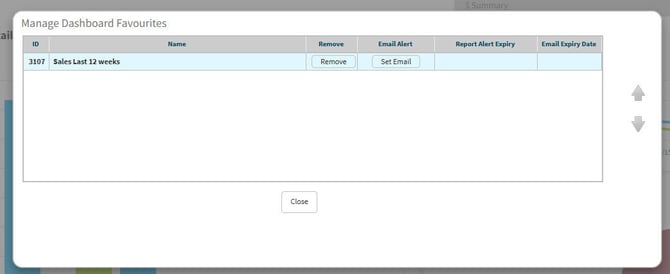
In the popup, you can delete the dashboard, Set or remove the Favorite email
#### **Additional Tips**
- **Customization:** Customize your favorites list to match your daily tasks and operational needs.
- **Regular Updates:** Periodically review your list to add new dashboards and remove any that are no longer relevant.
- **Troubleshooting:** If a dashboard doesn’t appear in your favourites, verify your selection or refresh the page.
#### **Conclusion**
Managing your favorite dashboards in Krunchbox is a simple yet powerful way to personalize your workspace and boost your productivity. By following these steps, you can ensure that your most important data is always just a click away.
To learn more about Managing Favourite Dashboards, watch the following short video:
For further assistance, please consult additional training materials or reach out to our support team at [support@krunchbox.com](https://academy.krunchbox.com/knowledge/support@krunchbox.com?hsLang=en)
- [Training Guides](https://academy.krunchbox.com/knowledge/training-guides?hsLang=en)
- [How-to Articles](https://academy.krunchbox.com/knowledge/how-to-articles?hsLang=en#main-content)
- [Dashboards](https://academy.krunchbox.com/knowledge/how-to-articles?hsLang=en#dashboards)
- [Reports](https://academy.krunchbox.com/knowledge/how-to-articles?hsLang=en#reports)
- [Account Management](https://academy.krunchbox.com/knowledge/how-to-articles?hsLang=en#account-management)
- [krunchbox Go](https://academy.krunchbox.com/knowledge/how-to-articles?hsLang=en#krunchbox-go)
- [Retail Data Setup Guides](https://academy.krunchbox.com/knowledge/retail-data-setup-guides?hsLang=en)
- [Customer training](https://academy.krunchbox.com/knowledge/customer-training?hsLang=en)
- [Beta Resources](https://academy.krunchbox.com/knowledge/beta-resources?hsLang=en#main-content)
- [Beta Predict](https://academy.krunchbox.com/knowledge/beta-resources?hsLang=en#beta-predict)
[](http://www.krunchbox.com)
Krunchbox Help Center
[mailto:support@krunchbox.com](mailto:support@krunchbox.com)
Copyright © 2025, Krunchbox Inc.